On this page 32
AI coding tools have changed how SaaS products get built. With vibecoding, founders and small teams describe what they want in natural language and get working software back in hours. That speed is real, but it moves the hard part of a launch somewhere else: deciding what to build, proving the code is safe to put in front of paying customers, and getting the product to the right buyers.
This guide is written for founders and product managers preparing a SaaS launch. It covers scope and validation, production readiness for AI-generated code, the risks specific to AI-built and AI-powered products, and the go-to-market basics that still decide whether a launch works. A full checklist sits at the end.
Quick answer
A SaaS launch checklist in the AI era covers the usual launch work (validated scope, pricing, onboarding, analytics) plus checks for AI-specific risk: security review of generated code, tests and monitoring that a human understands, controls for AI features that can produce wrong output, and a clear view of inference costs. The goal is to keep the speed AI tools give you without shipping a prototype as if it were a product.
What Changes When AI Writes Much of the Code
From writing code to directing it
- Developers guide, test and refine AI-generated code instead of writing every line.
- Non-engineers can build working prototypes from prompts, which lowers the cost of trying an idea.
- More products reach the market, and many of them look similar. Building is no longer the main barrier, so differentiation and distribution matter more.
What customers now expect
Buyers increasingly expect AI-assisted workflows and integrations with the tools they already use. They also expect software that works reliably, protects their data and explains what its AI features are doing. A fast build does not lower that bar.
For founders, the practical question is how much of the product to build with AI tools and where to slow down. Our guide to building an AI startup MVP covers how to scope the first version around one problem you can validate.
Have an idea you want to test with real users?
Lightrains builds AI-assisted MVPs for founders who need a working product in front of users quickly. The process runs from scope definition and prototyping through a build sprint, QA and production deployment, typically in 2 to 4 weeks.
See how the Lightrains vibe-coded MVP process works
Before You Build: Scope and Validation
Validate the problem, not the feature list
- Know the buyer: Identify who feels the pain, who pays and how comfortable they are with AI tools.
- Validate demand early: Use interviews, a landing page or a clickable prototype before a full build. AI makes building cheap, but launching the wrong product is still expensive.
- Cut the scope: Pick the smallest set of features that proves the core value. Everything else goes on a post-launch list.
Decide where AI belongs in the product
There are two separate decisions here, and teams often blur them:
- AI as a build tool: Using AI to write code faster. This affects your engineering process and code quality.
- AI as a product feature: Shipping features powered by a language model or other ML model. This affects your user experience, costs and risk profile.
You can use AI for one without the other. An AI feature should earn its place by improving a user outcome, not because competitors mention AI on their homepage.
Production Readiness for AI-Built Code
A prototype that works in a demo is not ready for customers. Before launch, make sure:
- Someone has reviewed the code. AI-generated code can contain insecure defaults, duplicated logic and dependencies nobody chose deliberately. A senior engineer should read and own the critical paths: authentication, payments, data access and multi-tenant isolation.
- Security has been checked. Run a security scan against common web vulnerabilities (the OWASP Top 10 is a sensible baseline), review API authorization rules and confirm secrets are not hard-coded.
- Tests exist for what matters. Unit and integration tests for core flows give you a safety net when you, or an AI tool, change the code later.
- Infrastructure is real. CI/CD, backups, environment separation, logging and monitoring should be in place before the first paying customer.
- Someone can explain the architecture. If the only record of how the system works is a chat history with an AI tool, the next developer will struggle. Document the key decisions.
Testing AI features specifically
If the product includes AI features, standard functional tests are not enough:
- Build a set of representative inputs and expected outputs, and run it every time you change prompts or models.
- Test edge cases and adversarial inputs, including attempts to make the feature ignore its instructions.
- Measure response times and failure rates under realistic load.
AI-Specific Launch Risks
These risks either did not exist or were much smaller before AI tools became part of the build process. Plan for them explicitly.
Risks from AI-generated code
- Security gaps: Generated code often works but skips input validation, rate limiting or proper access checks.
- Hidden technical debt: Fast generation can produce inconsistent patterns that become expensive to change after launch.
- Licensing and dependency risk: Check what packages were pulled in and whether their licenses suit a commercial product.
Risks from AI features in the product
- Wrong or fabricated output: Language models can produce confident but incorrect answers. Decide where a wrong answer is tolerable and where a human must review it.
- Prompt injection and data leakage: If the feature reads user-supplied content or connects to internal data, test whether it can be manipulated into exposing information.
- Inference costs: Every AI request has a cost. Model it per user and per plan before setting prices, or heavy users can turn a paying customer into a loss. Our guide on AI ROI covers how to weigh model cost against business value.
- Model and vendor dependency: Providers change models, pricing and rate limits. Keep the model behind an internal interface so you can switch or fall back without rewriting the product.
Compliance and trust
- Tell users when they are interacting with AI and what data it uses.
- Offer a way to override or correct AI suggestions.
- Track the AI and data-protection rules that apply in your target markets, especially if you sell to customers in the EU or in regulated industries.
Go-to-Market Basics
Positioning
- Lead with the outcome: Describe the problem you solve and the result users get. “AI-powered” on its own does not differentiate.
- Know your competitors’ AI story: Check how competitors use AI in their workflow and where your approach is genuinely better.
Pricing
- Give users a way to try the product: A free tier or trial lets users experience the core value, including AI features, before paying.
- Price with your cost model in view: Tie plan limits to the features that drive inference or infrastructure cost.
Onboarding
- Get users to the first useful result quickly. Guided setup and sample data help.
- Explain AI features plainly: What they do, what data they use and how to turn them off.
- Separate AI suggestions from user actions in the interface so users always know what they did and what the system proposed.
Marketing
- Educational content that shows the workflow your product improves works better than feature lists.
- Email remains a strong channel for onboarding and activation, especially in the first weeks after signup.
Measuring a Launch
Track standard SaaS metrics from day one: activation rate, retention, conversion from trial to paid, churn and customer acquisition cost. For AI features, add:
- AI feature adoption: the share of active users who use it more than once
- Quality signals, such as how often users accept, edit or reject AI output
- Response time and error rate for AI requests
- Inference cost per active user
Use these numbers to decide what to improve next, rather than adding features because the AI tools make it easy.
When to Bring In a Development Partner
Many founders build the first prototype themselves with AI tools. That is a good way to test an idea. Consider bringing in an experienced team when:
- You have users or a waitlist and the prototype is not production-ready. Security, testing and infrastructure work is where AI-built prototypes most often fall short.
- The product handles payments, personal data or customer data from other businesses. The cost of a breach is far higher than the cost of a review.
- You are raising money. Investors and enterprise buyers increasingly ask about code quality, security and who owns the technical decisions.
- Nobody on the team can confidently change the codebase. If every change depends on re-prompting an AI tool, the product will slow down as it grows.
The right partner should be able to review what you have, keep what works and harden the rest, rather than insisting on a rewrite. For broader product strategy and engineering support beyond the first release, Lightrains also offers product development consulting.
The SaaS Launch Checklist
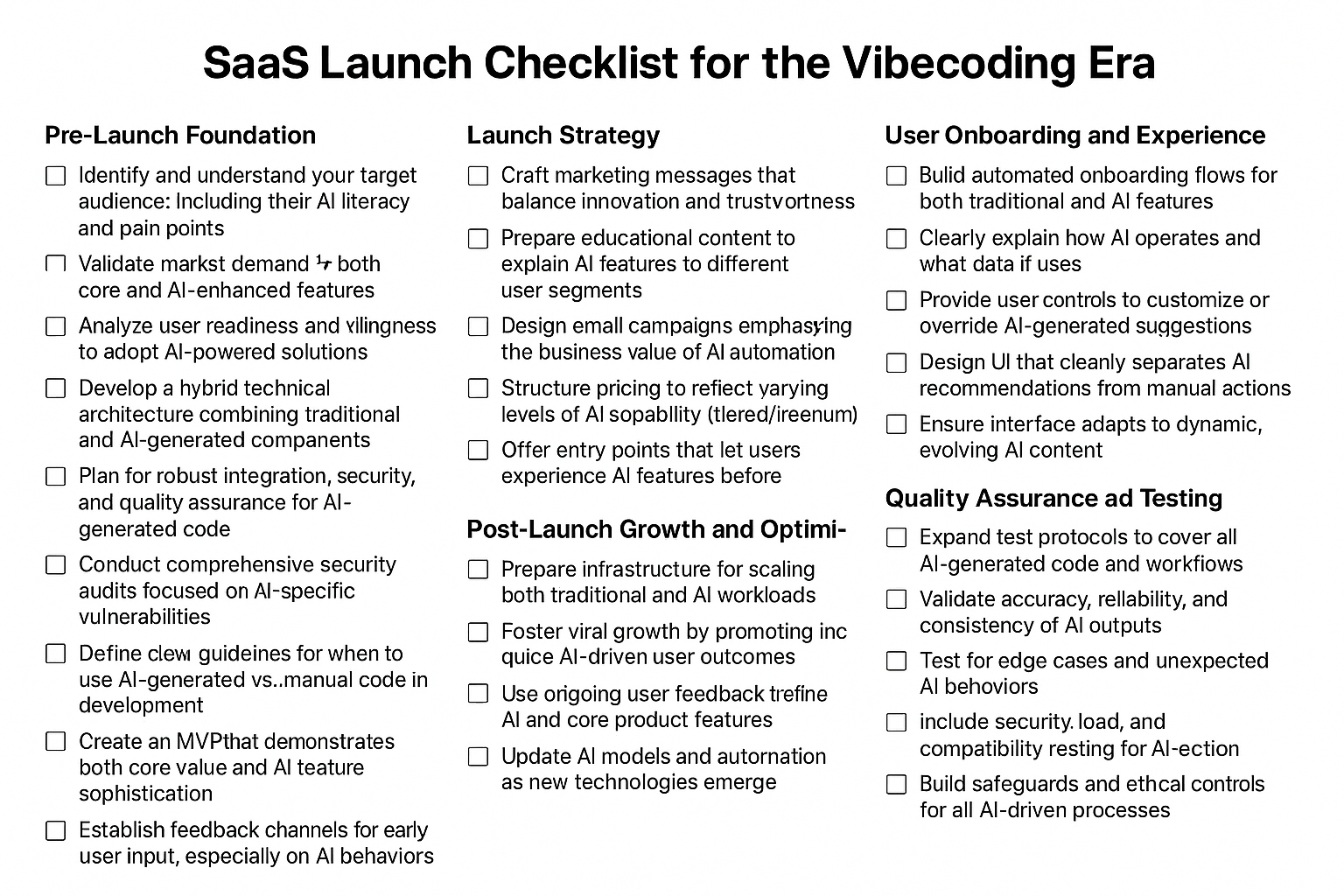
Scope and validation
- Identify your target buyer, their pain points and their comfort with AI tools
- Validate demand for the core problem before building the full product
- Define the smallest feature set that proves the core value
- Decide separately where AI is a build tool and where it is a product feature
- Analyze competitors, including how they use AI
- Write a value proposition based on user outcomes, not AI novelty
- Set up feedback channels for early users, including feedback on AI behavior
Production readiness
- Have a senior engineer review authentication, payments, data access and tenant isolation
- Run a security scan and fix findings against a baseline such as the OWASP Top 10
- Confirm no secrets are hard-coded and API authorization is enforced server-side
- Add unit and integration tests for core user flows
- Set up CI/CD, environment separation, backups and a recovery plan
- Add logging, monitoring and alerting
- Document the architecture and key technical decisions
- Review third-party dependencies and their licenses
AI feature readiness
- Build an evaluation set of representative inputs and expected outputs
- Test edge cases, adversarial inputs and prompt injection attempts
- Define where human review is required for AI output
- Model inference cost per user and per plan
- Put the model behind an internal interface with a fallback option
- Load test AI features for response time and error rate
Go-to-market
- Write messaging that leads with outcomes and builds trust
- Prepare educational content that shows the workflow your product improves
- Plan onboarding and activation emails
- Structure pricing so plan limits reflect your cost drivers
- Offer a free tier or trial so users can reach the core value before paying
Onboarding and experience
- Build an onboarding flow that reaches a first useful result quickly
- Explain what AI features do and what data they use
- Let users customize, override or turn off AI suggestions
- Separate AI recommendations from user actions in the interface
Measurement
- Track activation, retention, trial-to-paid conversion and churn
- Track AI feature adoption and accept, edit and reject rates
- Monitor AI response times, error rates and inference cost per user
- Review metrics regularly and use them to set the roadmap
Risk and compliance
- Publish clear policies on data use and AI decisions
- Communicate AI limitations and provide fallbacks when AI features fail
- Review AI and data-protection requirements in your target markets
- Re-audit code and AI behavior after major changes
After launch
- Prepare infrastructure for growth in both application and AI workloads
- Use user feedback to prioritize improvements to core and AI features
- Re-evaluate models and providers as pricing and capabilities change
- Build advantages that generic AI tools cannot copy easily: domain expertise, proprietary data, customer relationships and user experience
Conclusion
AI tools let small teams build SaaS products faster than ever. They do not remove the work that decides whether a launch succeeds: validating the problem, making the code safe for customers, controlling the risks of AI features and reaching the right buyers.
Use AI to move quickly on the parts that are easy to change, and slow down on security, data handling and pricing. If you are still deciding where AI fits in your product, our analysis of AI product opportunities in agentic commerce shows how autonomous agents are changing what buyers expect from software.
Built a prototype with AI tools and need it ready for customers?
Lightrains takes AI-built prototypes to production with human code review, security hardening, automated tests, CI/CD and monitoring. Bring your existing codebase and we will tell you what is ready for launch and what needs work.
Get your AI-built prototype production-ready
Prefer to start with a scoped estimate? Request a free quote for your SaaS launch.
This article originally appeared on lightrains.com
Leave a comment
To make a comment, please send an e-mail using the button below. Your e-mail address won't be shared and will be deleted from our records after the comment is published. If you don't want your real name to be credited alongside your comment, please specify the name you would like to use. If you would like your name to link to a specific URL, please share that as well. Thank you.
Comment via email