Most AI agent projects do not fail because of bad models. They fail because teams automate the wrong things, connect the wrong data sources, or skip guardrails entirely and then wonder why the bot confidently hallucinated a refund policy.
This guide covers how to actually build AI agents for business use cases: customer support, sales, and operations. No fluff, no “AI-powered” jargon. Just the structure, the trade-offs, and what the numbers look like when it works.
If you want a custom agent built around your specific workflows, talk to the Lightrains team. We have shipped agents into production for logistics firms, fintechs, and ecommerce platforms, and the patterns below come from those deployments.
What Is an AI Agent, Really?
An AI agent is a system that takes a goal, reasons through it, uses tools, and produces an outcome. Not a chatbot that answers FAQs. Not a script that responds to keywords. A system that can:
- Understand what the user actually needs
- Decide which action to take
- Call external tools (search, APIs, databases)
- Hand off to a human when it hits its limits
The difference between a chatbot and an agent is the ability to act autonomously within defined boundaries. A FAQ bot answers questions. An agent resolves tickets, qualifies leads, or updates records without a human in the loop for routine cases.
Where Agents Add the Most Value
Customer Support
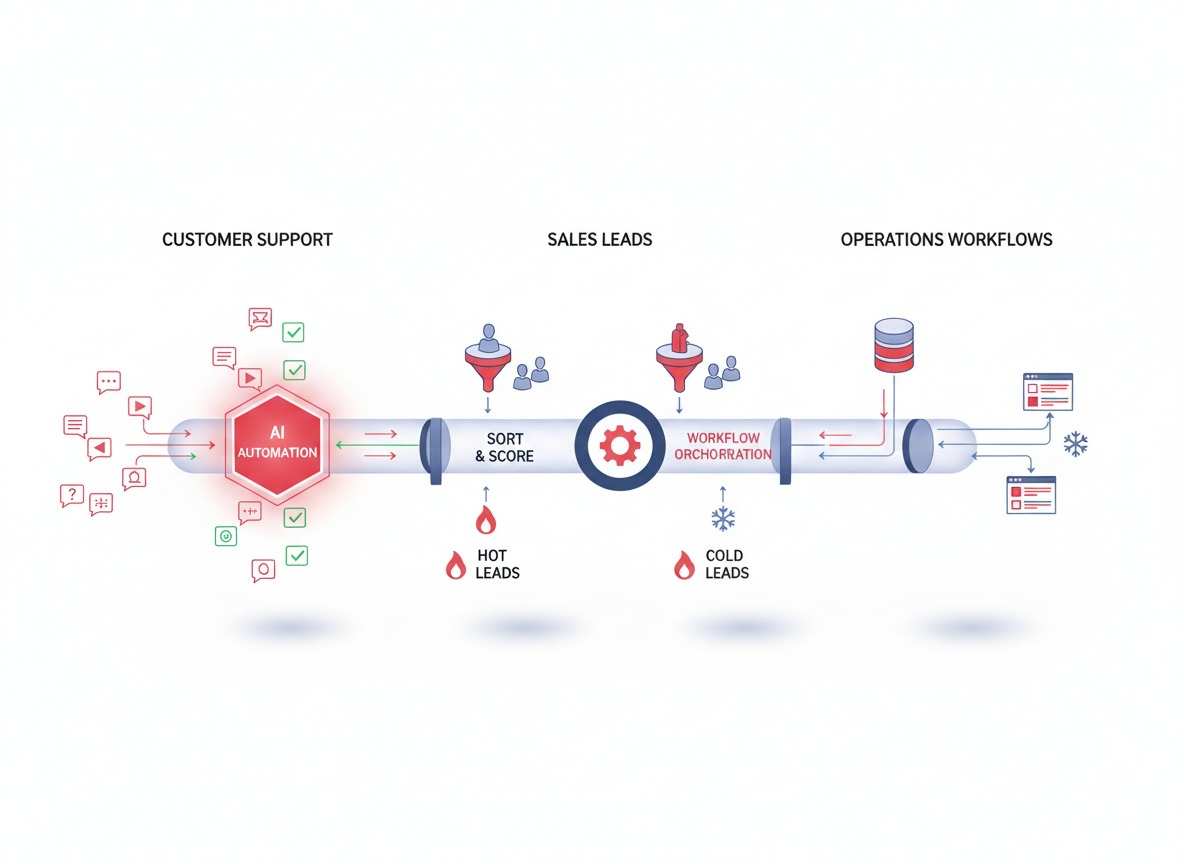
Support teams spend most of their time on three things: ticket triage, answering repetitive questions, and escalating edge cases. AI agents handle all three.
Ticket triage: An agent reads a new ticket, classifies it by urgency and category, and routes it to the right queue. For a mid-sized SaaS company processing 200 tickets per day, this alone can free 15-20 hours of human review time weekly.
FAQ handling: Agents that connect to your knowledge base can answer product questions, pricing inquiries, and policy questions in seconds. The deflection rate depends on how well your documentation is structured, but 40-60% of inbound support volume is typically automatable.
Escalation logic: Agents know when they are out of their depth. A well-designed agent escalates with full context attached, so the human who picks it up does not have to re-read the thread.
Sales
Sales teams lose deals because of slow follow-up, inconsistent nurture sequences, and poor lead qualification at scale. AI agents address all three.
Lead qualification: An agent can score leads based on firmographic data, engagement signals, and conversation history. Instead of a SDR spending 5 minutes on a low-fit lead, the agent qualifies it in real time and flags high-fit leads for immediate outreach.
Follow-up automation: After a demo, an agent can send personalized follow-up sequences based on what the prospect asked about, without waiting for a rep to remember. This cuts response time from hours to minutes.
Meeting booking: Agents that integrate with your calendar and CRM can handle the back-and-forth of scheduling without a human touching it. For teams doing 20+ demos per week, this is not trivial.
Operations
Operations teams deal with internal knowledge lookup, reporting, and workflow automation. These are boring problems, but solving them with agents has massive compounding returns.
Internal knowledge lookup: Instead of searching Confluence or asking colleagues, employees ask an agent that has indexed your internal docs, past projects, and policies. This works well when your documentation is well-structured. It fails fast when it is not.
Reporting: Agents can pull data from multiple sources, generate summaries, and surface anomalies. A daily ops report that takes 45 minutes to compile can run automatically each morning.
Workflow automation: Agents can trigger actions across systems (create a Jira ticket, update a Salesforce record, send a Slack message) based on events or schedules.
Core Architecture of a Business AI Agent
Every production agent we have built follows the same layered structure:
┌─────────────────────────────────────────────────────┐
│                    User Input                       │
│         (ticket, query, email, voice)              │
└─────────────────────┬───────────────────────────────┘
                      │
┌─────────────────────▼───────────────────────────────┐
│              Routing / Intent Layer                 │
│         (classify intent, extract entities)         │
└─────────────────────┬───────────────────────────────┘
                      │
┌─────────────────────▼───────────────────────────────┐
│              Reasoning / Agent Core                 │
│         (LLM + system prompt + tools)               │
└─────────────────────┬───────────────────────────────┘
                      │
         ┌────────────┴────────────┐
         │                      │
┌────────▼────────┐  ┌──────────▼──────────┐
│  Knowledge Base │  │   Tool Layer        │
│  (RAG, docs,     │  │   (CRM, calendar,  │
│   vector store)  │  │    search, APIs)   │
└──────────────────┘  └─────────────────────┘
                      │
┌─────────────────────▼──��────────────────────────────┐
│              Action / Output Layer                   │
│    (email, ticket update, API response, UI)          │
└─────────────────────────────────────────────────────┘
The routing layer decides what the user wants and classifies it into a handler. This is where most agent reliability starts or breaks.
The agent core contains the LLM, the system prompt that defines behavior, and the tool definitions. Prompt quality here is everything.
The knowledge base is your internal data: product docs, past tickets, FAQs, policy documents. We typically use vector search (Qdrant or Pinecone) with a retrieval-augmented generation (RAG) layer.
The tool layer gives the agent capabilities beyond text generation: it can read from your CRM, write to your database, search the web, or trigger external webhooks.
The output layer decides how the result gets delivered: email response, ticket update, API response, or user-facing message.
How to Build One in Practice
Step 1: Pick One Workflow and Go Deep
Do not try to automate your entire operations stack on day one. Pick one high-volume, well-defined workflow and build it properly.
For support: start with ticket classification and first-response drafts. For sales: start with lead scoring and meeting booking. For ops: start with internal knowledge search.
The goal of the pilot is to learn what your data looks like, where the edge cases live, and what your users actually need versus what you assumed they needed.
Step 2: Define Inputs, Outputs, and Guardrails
Before you write a single prompt, document the following:
- What inputs does the agent receive? (ticket body, email content, CRM data, user profile)
- What outputs does it produce? (classification label, draft response, CRM update, alert)
- What are the hard boundaries? (never approve refunds over X amount, never share pricing to competitors, always include human review for escalations)
Guardrails are not optional. Without them, you will ship an agent that confidently does things you did not intend. We use structured output schemas (Pydantic models) to enforce consistent responses and validate every tool call before execution.
Step 3: Connect Data Sources Early
Agents are only as good as their data access. If your agent needs to look up order status, it needs a live connection to your order management system, not a static FAQ document.
Map the data flows before you build the reasoning layer. For each data source, ask:
- Is it structured (CRM, database) or unstructured (docs, past tickets)?
- How fresh does it need to be?
- Who has permission to access it?
- What does a bad or missing response look like, and how should the agent handle it?
For unstructured data, we typically build a RAG pipeline with chunking, embedding, and vector search. For structured data, direct API calls with proper error handling work better.
Step 4: Add Tool Use and Escalation Rules
Define the tools the agent can call. Examples:
search_knowledge_base(query)- retrieve relevant docsget_order_status(order_id)- fetch from order systemcreate_ticket(category, priority, description)- write to support systemsend_email(recipient, subject, body)- trigger email actionescalate_to_human(ticket_id, reason)- hand off to human
For each tool, define preconditions: when can this tool be called, and what does the agent do if it returns an error? Agents that do not handle tool failures gracefully will either hallucinate responses or go silent, and both outcomes damage trust.
Escalation rules should be explicit and conservative. When the agent is uncertain, when the query involves sensitive data, or when the user explicitly asks for a human, escalate with full context attached.
Step 5: Test, Monitor, and Improve
Launching is not the hard part. Measuring whether the agent is actually helping is.
Key metrics to track from day one:
- Deflection rate: percentage of interactions handled without human intervention. Target varies by domain, but 30-50% is achievable in the first quarter.
- First response time: time from ticket creation to first meaningful response. Agents typically cut this from hours to seconds for routine queries.
- Resolution accuracy: percentage of agent-handled cases that did not require human correction. Track this by tagging “agent-assisted” versus “human-only” resolutions.
- Escalation rate: how often the agent hands off to humans. A high escalation rate might mean guardrails are too conservative, or it might mean the agent is hitting edge cases you did not anticipate.
Monitor not just aggregate metrics but per-session quality. Sample 5-10 agent conversations weekly and review them manually. You will find patterns that metrics alone miss.
Common Mistakes and How to Avoid Them
Automating too much too fast. Teams launch an agent with broad scope, it fails on edge cases, and the blast radius is large. Start narrow, prove value, expand scope.
Weak prompts and missing edge case handling. The system prompt is not a one-time write. It needs iteration based on production behavior. Budget time for prompt refinement after launch.
No CRM or helpdesk integration. An agent that cannot read from or write to your existing systems creates more work than it saves. Integrate early, even if the integration is basic.
No monitoring or fallback path. If the agent goes down or produces a bad output, there should be a clear fallback: a simple auto-reply, a human handoff, or a “please try again later” message. Do not leave users hanging.
Skipping data quality. Agents are sensitive to the quality of their knowledge base. If your docs are outdated, your product names are inconsistent, or your FAQ answers are vague, the agent will reflect all of that. Clean your data before you build the RAG layer.
Cost and Timeline: What to Expect
For a single well-scoped workflow (e.g., support ticket classification plus draft responses):
- Pilot build: 4-6 weeks, depending on data readiness and integration complexity
- Cost range: $15,000-$40,000 for a custom agent with production-grade guardrails and monitoring
- Ongoing cost: primarily LLM API calls (depends on volume; expect $0.05-$0.50 per conversation for mid-size deployments)
For a multi-agent system handling support, sales, and ops across the organization:
- Timeline stretches to 3-6 months
- Costs scale with scope, integrations, and customization
The biggest variable is data readiness. Organizations with clean, structured data and existing API integrations move faster. Organizations that need data cleanup, schema design, or new integrations first will spend more time on foundation before the agent ships.
Build vs Buy
Off-the-shelf tools work for generic use cases. If you need FAQ bots, generic support assistants, or simple scheduling, tools like Intercom Fin, Zendesk AI, or HubSpot ChatSpot cover the basics.
Custom agents make sense when:
- Your workflows involve proprietary data that cannot leave your systems
- You need deep integrations with internal tools (ERP, custom CRMs, legacy systems)
- You need specific behavior that generic tools cannot replicate
- Compliance requirements mandate audit trails, data isolation, or custom governance
For teams with unique workflows and competitive differentiation in their customer or operations experience, custom agents deliver better ROI than bolt-on chatbots.
ROI: What the Numbers Look Like
For a mid-sized company (50-200 support tickets per day):
- Automating ticket triage and first responses at 40% deflection saves 20-30 hours of human time daily
- At an average support cost of $15-25 per ticket, that is $300-$750 per day in avoided cost
- Annualized, that is $75,000-$180,000 in support cost reduction for a single workflow agent
Sales and ops ROI is harder to attribute directly, but lead response time improvements alone typically show 10-20% gains in conversion rates for teams that adopt AI-assisted follow-up.
The baseline: most organizations see positive ROI within 90 days of a well-scoped agent launch.
When to Get Help
If any of the following sound familiar, talk to someone who has done this before:
- You have data spread across multiple systems with no clean API access
- Your support or sales workflows are complex, with many conditional rules
- You need to meet compliance requirements (SOC 2, HIPAA, GDPR) that affect how data can be processed
- You have already tried a chatbot or FAQ bot and it underperformed
Contact Lightrains for a discovery session. We will map your workflows, assess your data readiness, and give you a realistic timeline and budget before you commit to anything.
Next Steps
Build the pilot. Pick the one workflow that wastes the most time, connect the data, define the guardrails, and ship it. Measure deflection rate, escalation rate, and user satisfaction. Iterate.
The agents that win are not the most sophisticated. They are the ones that reliably handle the cases they are designed for, and gracefully hand off the rest.
This article originally appeared on lightrains.com
Leave a comment
To make a comment, please send an e-mail using the button below. Your e-mail address won't be shared and will be deleted from our records after the comment is published. If you don't want your real name to be credited alongside your comment, please specify the name you would like to use. If you would like your name to link to a specific URL, please share that as well. Thank you.
Comment via email
![Cross-Provider AI Brand Visibility Audit [Step-by-Step]](/open-graph/blogs/cross-provider-ai-brand-visibility-audit.png)