On this page 13
How to Build an AI Support Agent with ElevenLabs
Building an AI support agent with ElevenLabs enables businesses to deploy intelligent voice assistants that handle customer queries naturally and efficiently. This guide walks through the technical implementation while sharing practical insights from our AI development services team.
ElevenLabs provides a Conversational AI platform combining advanced voice synthesis with large language model capabilities. The platform supports real-time voice interactions, customizable agent personas, and integration with existing customer service workflows. Teams use these agents to answer product questions, troubleshoot issues, and guide users through support processes without human intervention.
Who This Is For
This guide is for product teams and engineering leads evaluating voice AI for customer support. You’ll benefit most if you’re:
- Evaluating AI agents to handle tier-1 support inquiries
- Looking to reduce response times for common customer questions
- Building a hybrid support model combining AI voice agents with human agents
- Exploring voice AI as an alternative to text-based chatbots
When to Use Voice AI Support Agents
Voice AI support agents work well for high-volume, repetitive inquiries where fast response times matter. Common use cases include:
- Order status and tracking inquiries: Customers can ask about order status via voice without waiting on hold
- FAQ responses: Standard product questions, policy inquiries, and troubleshooting steps
- Appointment scheduling: Voice agents can handle booking, rescheduling, and cancellations
- Technical troubleshooting: Guided voice flows for common technical issues
Voice AI is less suitable for complex grievances, emotionally charged conversations, or situations requiring deep contextual understanding.
Architecture Overview
A typical ElevenLabs AI support agent integration includes:
- Voice input: Real-time speech recognition capturing customer queries
- LLM processing: The language model interprets intent and generates appropriate responses
- Voice synthesis: ElevenLabs converts text responses to natural-sounding speech
- Integration layer: Connects to your CRM, ticketing system, or knowledge base
For teams building enterprise AI agents at scale, consider the architectural patterns covered in our enterprise AI agent guide.
Common Failure Points
Based on our AI consulting experience, several issues commonly cause AI support agent implementations to underperform:
- Unclear escalation paths: Agents that cannot recognize when to transfer to human agents
- Knowledge base gaps: FAQ content that wasn’t designed for conversational AI
- Latency issues: Voice response delays exceeding 2-3 seconds hurt user experience
- Limited language coverage: Multilingual support requires separate voice model training
- Poor fallback handling: When the agent doesn’t understand, users get stuck
Addressing these upfront improves deployment success rates significantly.
Enterprise Rollout Considerations
Rolling out voice AI support at scale requires attention to:
- Compliance: Ensure voice interactions meet relevant data protection regulations
- Monitoring: Track conversation success rates, escalation frequency, and user satisfaction
- Phased rollout: Start with low-risk inquiry types before expanding to complex support flows
- Human handoff: Design clear protocols for when and how agents transfer to human support
In this guide, we’ll walk through creating and deploying an AI support agent using ElevenLabs.
Step 1: Understanding ElevenLabs’ AI Agent
ElevenLabs offers advanced AI-powered voice synthesis and interaction tools. Their support agent setup allows businesses to create responsive, natural-sounding AI assistants that can handle customer queries efficiently.
Step 2: Creating Your ElevenLabs Account
To get started, sign up on ElevenLabs and navigate to the AI Agent dashboard. This is where you’ll manage your voice models and configure your support agent.
Step 3: Creating Agent
To set up your agent, navigate to your AI Agent dashboard Dashboard
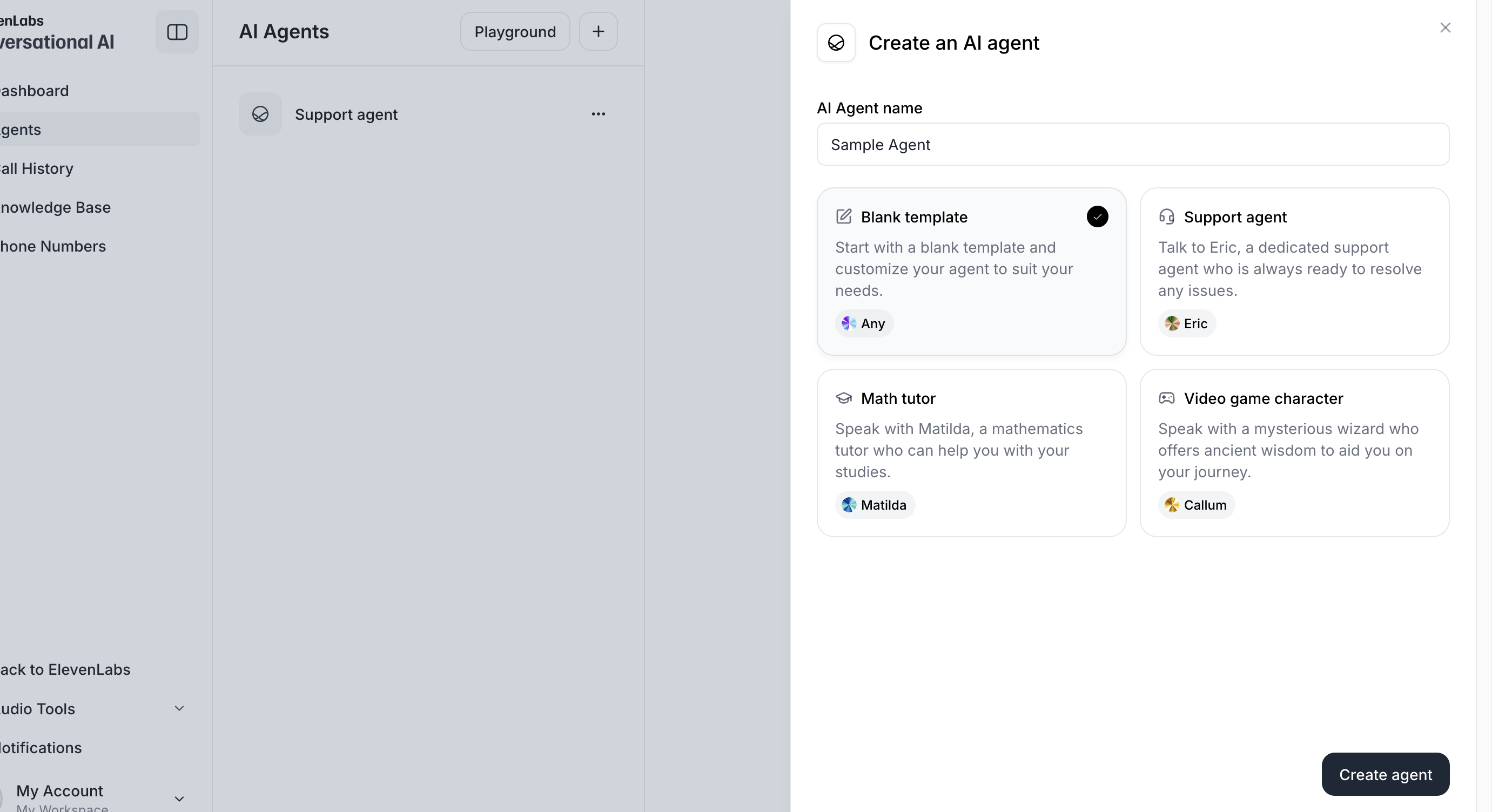
- Select click on
+icon, it will provide options with multiple templates to create agent - Choose
Blank templateor any other template if you have anything specific in mind - Click on
Create agentbutton
Different Types of Templates and Their Usage
ElevenLabs provides various templates to help users set up their AI agent efficiently. Here are the available options:
-
Blank Template – Start with a blank template and customize your agent to suit your needs. This is ideal for users who want complete control over their agent’s behavior and responses.
-
Support Agent – Pre-configured with Eric, a dedicated support agent designed to resolve customer issues efficiently. Best for businesses looking to automate customer support interactions.
-
Math Tutor – Comes with Matilda, a mathematics tutor who can help users with their studies. Suitable for educational platforms and tutoring services.
-
Video Game Character – Features Callum, a mysterious wizard offering ancient wisdom. Ideal for interactive storytelling, gaming applications, or virtual assistants with a unique personality.
Choosing the right template depends on your business needs. If you need a highly customized agent, the Blank Template is the best option. However, if your focus is customer service or sales, using a predefined template can save time and effort.
Step 4: Selecting or Training a Voice Model
ElevenLabs allows you to use pre-existing voices or train your own model.
-
Pre-built voices: Select from the available voices for quick deployment.
-
Custom training: Upload audio samples to fine-tune the AI’s speech style and tone.
Step 4: Customizing Your Agent
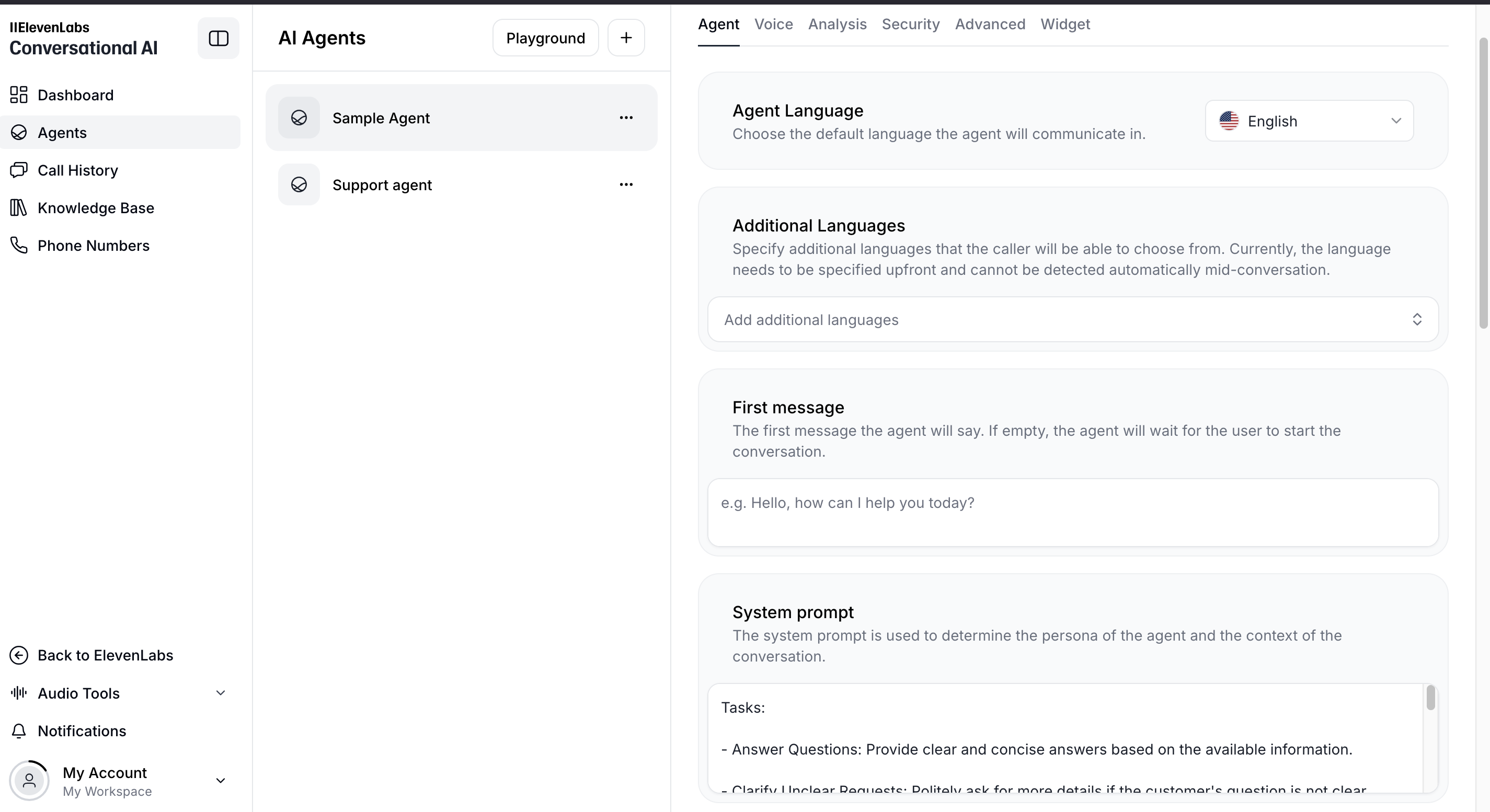
Once your agent is created, you can customize key attributes to enhance its performance:
-
Agent Language – Choose the language your AI agent will use to communicate with users. ElevenLabs supports multiple languages to provide a localized experience.
-
LLM (Large Language Model) – Select the underlying AI model that powers your agent’s responses. ElevenLabs offers different models optimized for specific use cases.
-
Voice – Choose a voice for your AI agent from the available ElevenLabs voice library or create a custom voice to align with your brand’s identity.
-
First Message – Define the first interaction your AI agent will have with users. This sets the tone for engagement and ensures a smooth user experience. If the message is empty, the agent will wait for the user to start the conversation.
Eg: Hello, how can I help you today? -
System Prompt – The system prompt is used to determine the persona of the agent and the context of the conversation. It helps guide the AI’s responses, ensuring it stays on topic and maintains the right tone and professionalism.
You are a friendly and efficient virtual assistant for [Your Company Name]. Your role is to assist customers by answering questions about the company’s products, services, and documentation. You should use the provided knowledge base to offer accurate and helpful responses.
// Example

Tasks:

- Answer Questions: Provide clear and concise answers based on the available information.
- Clarify Unclear Requests: Politely ask for more details if the customer's question is not clear.

Guidelines:

- Maintain a friendly and professional tone throughout the conversation.
- Be patient and attentive to the customer's needs.
- If unsure about any information, politely ask the customer to repeat or clarify.
- Avoid discussing topics unrelated to the company's products or services.
- Aim to provide concise answers. Limit responses to a couple of sentences and let the user guide you on where to provide more detail.
Need help building a voice AI support agent? Our team specializes in AI agent development and can help you design, implement, and optimize your customer service AI systems.
Partner with Lightrains for Your AI Integration Needs
While setting up an AI support agent with ElevenLabs can be straightforward, implementing a comprehensive AI strategy requires expertise and experience. Lightrains Technolabs specializes in helping businesses leverage AI solutions effectively:
- Custom AI Development: Our team can build tailored AI solutions that align perfectly with your business needs and objectives
- Integration Services: We ensure seamless integration of AI agents with your existing systems and workflows
- AI Consulting: Get expert guidance on selecting and implementing the right AI technologies for your business
- Training & Support: We provide comprehensive training and ongoing support to help your team maximize the benefits of AI solutions
As certified AI development experts, we’ve helped numerous businesses across industries implement successful AI strategies. Whether you’re looking to set up an AI support agent or develop more complex AI solutions, our team can help you achieve your goals efficiently and effectively.
Contact us to discuss your AI agent implementation.
For teams exploring AI model optimization, our AI model optimization techniques guide covers practical approaches to improving AI system performance.
Conclusion
Setting up a support agent in ElevenLabs is a game-changer for businesses looking to enhance their customer experience with AI-driven interactions. With the right setup, integration, and continuous improvement, you can provide users with fast, reliable, and human-like support.
Last updated: April 9, 2026
This article originally appeared on lightrains.com
Leave a comment
To make a comment, please send an e-mail using the button below. Your e-mail address won't be shared and will be deleted from our records after the comment is published. If you don't want your real name to be credited alongside your comment, please specify the name you would like to use. If you would like your name to link to a specific URL, please share that as well. Thank you.
Comment via email
![Scaling a RAG Pipeline with Qdrant [Production Guide]](/open-graph/blogs/scaling-rag-pipeline-qdrant-production.png)
![From Fragmented Health Records to Unified AI Queries [Case Study]](/open-graph/blogs/case-study-health-records-platform.png)